Current Program 60 Students
If you have audited a class or applied to the program from Spring 2017 and onward, this page is for you.
Starting in Autumn 2026, admitted Program 60 students who go three years without enrolling will be placed on a leave of absence. You do not need to reapply to the program if/when you are ready to take classes again, just reach out to us to confirm your status and be reactivated if necessary. Also, you may also request to be placed on a leave of absence at any time if you no longer wish to participate.

NEW as of Summer 2026: we now have a dedicated CarmenCanvas page called Program 60 Training and Support, which is an extension of orientation.
Included on our Program 60 Training and Support page are helpful items including:
- recordings of orientation sessions;
- video demos on how to search for classes, complete the course request form, and use the OSU app to navigate campus;
- course ideas if you are not sure what you might want to take;
- opportunities to practice critical CarmenCanvas skills such as participating in discussions, taking quizzes, and submitting assignments;
- and more!
All newly admitted students for Summer 2026 and beyond are automatically added to the page. If you joined the program in Spring 2026 and earlier and would like access to it, please email us at program60@osu.edu from your Ohio State email account.
To Do Items Prior to Term
1. Log In to your My Buckeye Link Page
Go to Buckeye Link and click on My Buckeye Link and log in. If you forgot your password or need to update it, you can change it on the OSU Identity Management page. Verify that your contact information is accurate.
2. Check your To Do List items in My Buckeye Link
While logged in to your My Buckeye Link page, check the To Do List Items.
- Complete the Financial Responsibility Statement every term.
- Complete the Campus Safety Training once a year.
The STEP-UP for Sexual Misconduct training is mandatory for all OSU faculty, staff and students annually. If you forget to do it, a hold can be placed on your account and block us from enrolling you in classes. See the Civil Rights Office information on this training and if you have trouble accessing it, reach out to them at civilrightseducation@osu.edu. Since everyone takes the same training, each year's version is inactive after the deadline for faculty and staff to complete, but the Civil Rights Office can send you an alternate means of completing it.
3. Check your Ohio State email
Certain types of email will only be sent to your official Ohio State email account including some information from Program 60 staff. Be sure to review and delete any you no longer need.
The Office of Technology and Digital Innovation recently announced plans to move students from their current @buckeyemail.osu.edu accounts to @osu.edu accounts. This change will be happening in stages through Summer 2026 so keep an eye out on your Buckeyemail for more information. We will also share updates with students as we learn more
Preparing to Enroll
Step 1: Review Course Policies
You can save yourself some frustration by reviewing the Department Policies for Program 60 Participants page before making course selections. In addition to department specific policies, there are some additional general types of courses that are not appropriate for Program 60:
- Education Abroad;
- Internships;
- Research (including Honors and thesis research) - not expressly forbidden but unlikely to be given permission;
- Individualized Studies - not expressly forbidden but unlikely to be given permission;
- Capstone Courses.
Step 2: Search for Classes
We have two primary methods to search for courses. Review both options, outlined below, to successfully search for classes at Ohio State. We have a demo video available on the Program 60 CarmenCanvas page if you need a refresher on how to navigate and prefer seeing an example.
Class Search Methods
classes.osu.edu
On this website, you can use a more intuitive approach to finding classes. With the large amount to choose from, you can use the filters to find the right class for you.
- Go to classes.osu.edu;
- Select the campus at which you would like to take classes using the drop-down menu in the upper right-hand corner or using the filter in the right-hand sidebar;
- Determine the keywords you will use to search for classes (golf, history, creative writing, etc.);
- Search using your keywords, and filter your search by using the side bar to determine the term, campus, subject, academic career, program, component, class tribute, catalog number, time and instruction mode;
- If you would like to take an online course, select the Distance Learning option under Instruction Mode;
- Find the course(s) you are interested in and select Check Availability to see if there are spots still available;
- For future reference, you may wish to record all information about the course(s) you would like to take, including subject, course number, class number and instructor name.
Class Search (SIS)
This method will let you focus your search for courses and go through the Ohio State Course Catalog. Because of the large amount of course options available, be sure you use keywords and filters to find exactly what you’re looking for.
- Go to buckeyelink.osu.edu
- In the Search Buckeye Link window type class search
- In Results found for “class search” click on Class Search (SIS)
- Select the term, campus, subject, course career and select the arrow next to Additional Search Criteria to display more search options such as keywords
- To specifically search for online courses (if you would like to take an online course), select the arrow next to Additional Search Criteria to display more search options and select the Distance Learning option under Mode of Instruction
- Find the course(s) you are interested in and check if there are spots available by confirming there is a green circle under Status
- Carefully review each section of a class listing. A brief description, course fees, digital book fees, and specific information about class meetings may be listed. It is your responsibility to know if you must pay any fees for a class.
- For future reference, you may wish to record all information about the course(s) you would like to take, including subject, course number, class number, and instructor name.
Not sure what you might want to take?
We have created some course suggestions by topic that you can use for inspiration. These lists are not specific to any given semester, but provide the Subject, Course Number, and Title for the courses. You can use that information to use the 2 schedule search options above.
Course Suggestions by Topic (you will need to log in to your OSU account to be able to access these).
Step 3: Check Simple Syllabus (optional)
The Simple Syllabus library has syllabus information that can help you decide between courses. It is new as of Autumn 2026 and will grow over time.
Step 4: Submit Course Request Form
Written instructor permission is required for all Program 60 course enrollments. Permission is requested by filling out the Course Request Form when it is active for the semester.
This form sends your enrollment request to the Program 60 team and to the instructor. When the instructor responds, the response goes directly to the Program 60 Team. You will not receive a response from the instructor, but you will receive a receipt notice from Program 60.
You must fill out the form for each course you wish to take. During the enrollment period, if we receive your permission, our team will enroll you into the selected courses. You will not be able to enroll yourself.
In order to successfully complete the form, you will need to know the following information:
- Your OSU student ID number and your username (lastname.#)
- Subject/Department
- Course number (no dashes or spaces)
- Class number
- Recitation and/or Lab class number, if applicable
- Instructor's email address (Enter the instructor's name into the Search Ohio State directory to find this information.)
What happens after the form is submitted
If the instructor approves your request, we will add the course to your schedule as soon as possible and email you to notify you. If we need to waitlist you for the course, we will notify you of this as well.
If the instructor denies your request, we will immediately email you so that you can submit a request for a different course if desired.
You will have access to the course in Carmen after the course is activated, typically on the first day of the semester. If you are added to the course after the semester begins, you will have access to the course in Carmen on the next business day.
After Enrollment
1. Check your My Buckeye Link Page
Review your schedule on your My Buckeye Link page to verify that we added you to the correct class.
2. Check for any applicable course fees
As a reminder, there is no application fee to join Program 60 and there is no tuition or general fees charged. However, you are responsible for any course specific fees including Carment Books digital textbook fees. You will see these listed in the course descriptions (be sure to check both lecture and lab/recitation descriptions).
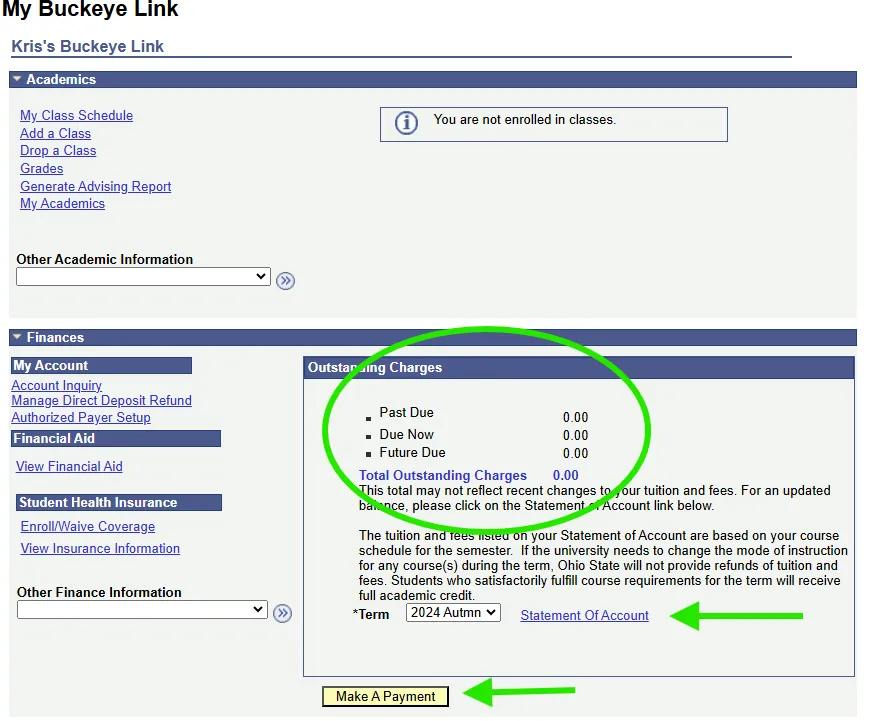
Most classes do not have digital textbook fees or course fees and so most students never need to pay any fees. For those courses that do, you will see them in your Statement of Account on your My Buckeye Link page. Failure to check your Statement of Account and pay any assessed fees will result in late fees being assessed and a hold placed against your account that prevents us from adding you to additional courses in subsequent terms.
You will find your Statement of Account in your My Buckeye Link page as well as the option to pay any fees online.
3. Find the CarmenCanvas page for your course
Nearly all courses will have a CarmenCanvas page, whether they are distance learning or in-person. The course will not be visible until published by the instructor. Most courses are published by the first day of the class.
- If you are added to the class before the semester starts, you will not see the class in CarmenCanvas until the professor publishes it.
- If you are added to the class after the term begins and/or the CarmenCanvas page is published, you will not see the course in CarmenCanvas until the next business day. Enrollment data is refreshed on a nightly basis.
If you are new to the program and have access to the Program 60 Training and Support page, you can practice some of your essential CarmenCanvas skills even before you are enrolled in any class.
4. Carmen Books (digital textbook) Information
If you course has a digital textbook, you will find it in CarmenCanvas. After you log in, go to your dashboard and look at the icons on the far left. Toward the bottom is one for Carmen Books. Click on that link to go to your bookshelf to find the book.
Program 60 students may opt out of purchasing the digital textbook but please consult with your course instructor first. Some books are critical for being able to participate and learn in the course (e.g. language courses), whereas others may not be needed if you are simply going to sit in on lectures.
You can opt out of the digital textbook on the Carmen Books bookshelf. The date to opt out for Autumn 2026 is September 4.
5. Talk to your instructor during the first week
Because Program 60 students are auditing the class, you have the option of negotiating the amount of work you intend to complete with the instructor. Some students plan to do all the same assignments as the regular students, others just want to sit in lecture.
Just as Program 60 students can specify what amount of work they want to do in the class, instructors may choose not to grade any assignments for auditing students. Most will still provide feedback but, particularly in larger courses, grading assignments takes time that the instructor may not have.
Having a conversation in the first week of class helps students and instructors get onto the same page about expectations for the experience.
6. Notify Program 60 if you cannot continue to attend your enrolled class
While Program 60 students are very courteous and nearly always remember to notify the instructor if they need to drop, we also need to know. Program 60 can officially drop the class for you as long as we have not passed the final drop deadline for the term in question. This not only lets us know that you were unable to continue in the course, but also ensures that, at the end of the term, your instructor is not required to post the R (which means "registered for audit" and stands in for a final grade).
Contact Program 60
We're here to help you achieve your academic goals. For general aid and questions about Program 60 at the Columbus campus, please email program60@osu.edu or call 614-247-0868.
If you have questions about your Ohio State username (last name.#), please contact the IT Help Desk at 614-688-4357(HELP).